How to Get Your Signature Under 20 KB for Online Forms
Almost every exam, job and admission form in India asks for a scanned signature: JPG, usually 10–20 KB. A phone photo of your signature is around 1–3 MB, and squeezing it down carelessly leaves a blurry smudge the portal may reject. Here’s how to get a clean signature under 20 KB in about two minutes, using only your phone.
The short answer
- Sign on plain white paper with a black or blue pen.
- Photograph it in daylight, then crop close to the ink.
- Open Compress to 20 KB, drop the photo in and tap Compress.
- Tap Download JPG and upload it.
What online forms usually ask for
| Rule | Usually |
|---|---|
| File type | JPG or JPEG |
| File size | 10–20 KB (sometimes up to 30 or 50 KB) |
| Ink and paper | Black or blue ink on white paper |
| Dimensions | Sometimes a pixel size (for example 140 × 60) or a size in centimetres |
These are typical figures, not a rule for every form. Always check the official notification for the exact limits, and follow it if it differs from anything here.
Step 1: Sign so it compresses well
- Plain white paper. No lines, no grid, no texture. Lines eat into your 20 KB.
- A dark pen with a medium tip. A gel or ball pen in black or blue. Very thin strokes break up when compressed.
- Sign a little larger than usual. Bigger strokes stay readable at small file sizes.
- Sign the way you will on exam day. Many exams compare your uploaded signature with the one you make in person.
Step 2: Take a clean photo
Use daylight near a window, hold the phone flat above the paper, and make sure your hand or phone doesn’t cast a shadow. A grey, shadowy background is the most common reason signatures look dirty after compression. Your phone’s document scanner mode (in Google Drive, Notes on iPhone or many camera apps) also works well, because it whitens the paper automatically.
Step 3: Crop close to the ink (this matters most)
We tested this. We took one phone photo of a signature and compressed it to under 20 KB twice: once as it was, and once after cropping close to the ink.

Uncropped, most of those 20 KB went on empty paper and the table it was lying on, and the signature itself ended up only about 840 pixels wide. Cropped, the whole 20 KB went on the signature, which kept about 1.5 times the width and much cleaner strokes. Crop in your phone’s photo editor, leaving a small white margin around the ink.
If the form gives exact dimensions, such as 140 × 60 pixels, crop to the same shape (wide and short) so nothing gets squashed later.
Step 4: Compress to under 20 KB
- Open stickerai.in/compress-image/to-20kb. Under 20 KB is already selected.
- Tap Choose images and pick your cropped signature.
- Tap Compress. You’ll see the new size and its pixel dimensions.
- Tap Compare to check the strokes are clean, then Download JPG.
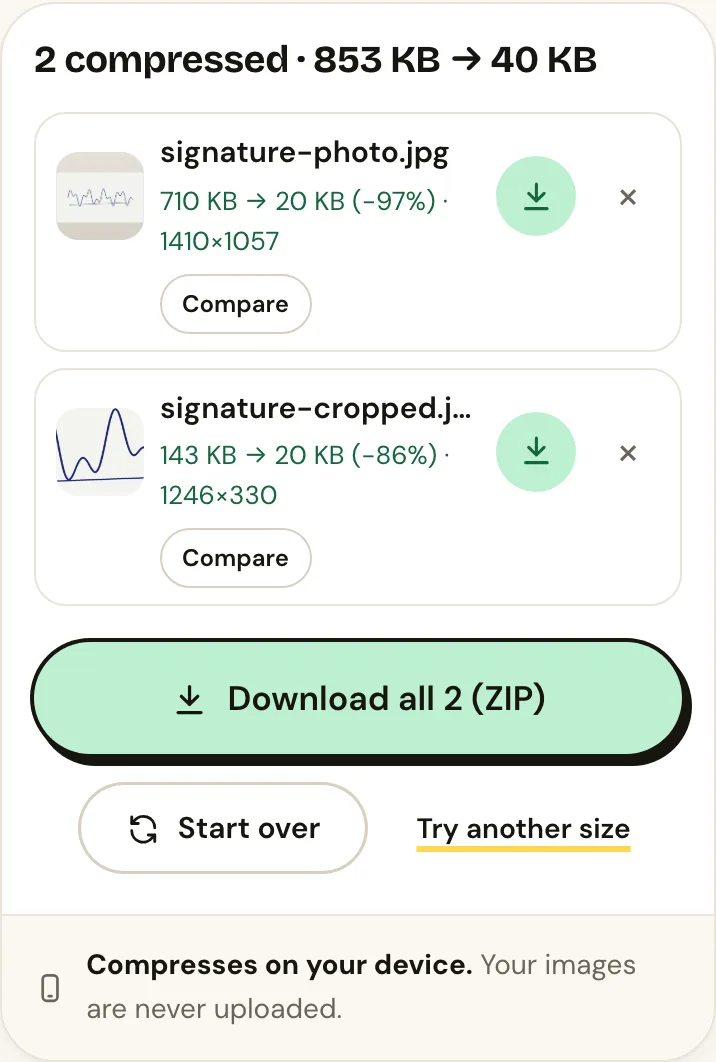
Tiny Images keeps the quality as high as the limit allows and only shrinks the dimensions when it has to, so your signature stays as large and sharp as 20 KB permits. It always saves a .jpg, which every portal accepts. Your signature never leaves your phone.
Form sets maximum pixels as well as KB? Tiny Images keeps as many pixels as fit in the KB limit, which can be more than a form allows. If the notice says something like “140 × 60 pixels”, resize to that in your phone’s editor first, then compress.
If the portal still rejects it
- “File size too small”: some forms need at least 10 KB. Tiny Images aims just under your limit, so a 20 KB target usually lands at 18–20 KB. If you used a smaller target, try 20 KB.
- “Invalid format”: check the file ends in .jpg. If your phone saved a HEIC or WebP, compressing with Tiny Images converts it to JPG automatically.
- Signature looks faint or grey: retake the photo in brighter light, or raise contrast slightly in your photo editor before compressing.
- Photo also needed? Use Compress to 50 KB for the passport photo. The form upload guide covers the other common errors.
Frequently asked questions
Can I sign on my phone screen instead of paper?
Some forms allow it, but many require a signature on paper. Check the notification. If in doubt, sign on paper; it also matches what you’ll do at the exam centre.
Can I compress the signature to exactly 20 KB?
Forms set a maximum, so the file needs to be under 20 KB, not exactly 20. Tiny Images gets as close to the limit as it can for the best quality.
Is it safe to compress my signature online?
With StickerAI, yes: it compresses inside your browser, so your signature is never uploaded to any server.
Hindi mein guide hai?
Haan. Photo aur signature ka size kam karne ki Hindi guide yahan hai: Photo का साइज़ कम कैसे करें.